How to Use Pakistan Citizen's Portal
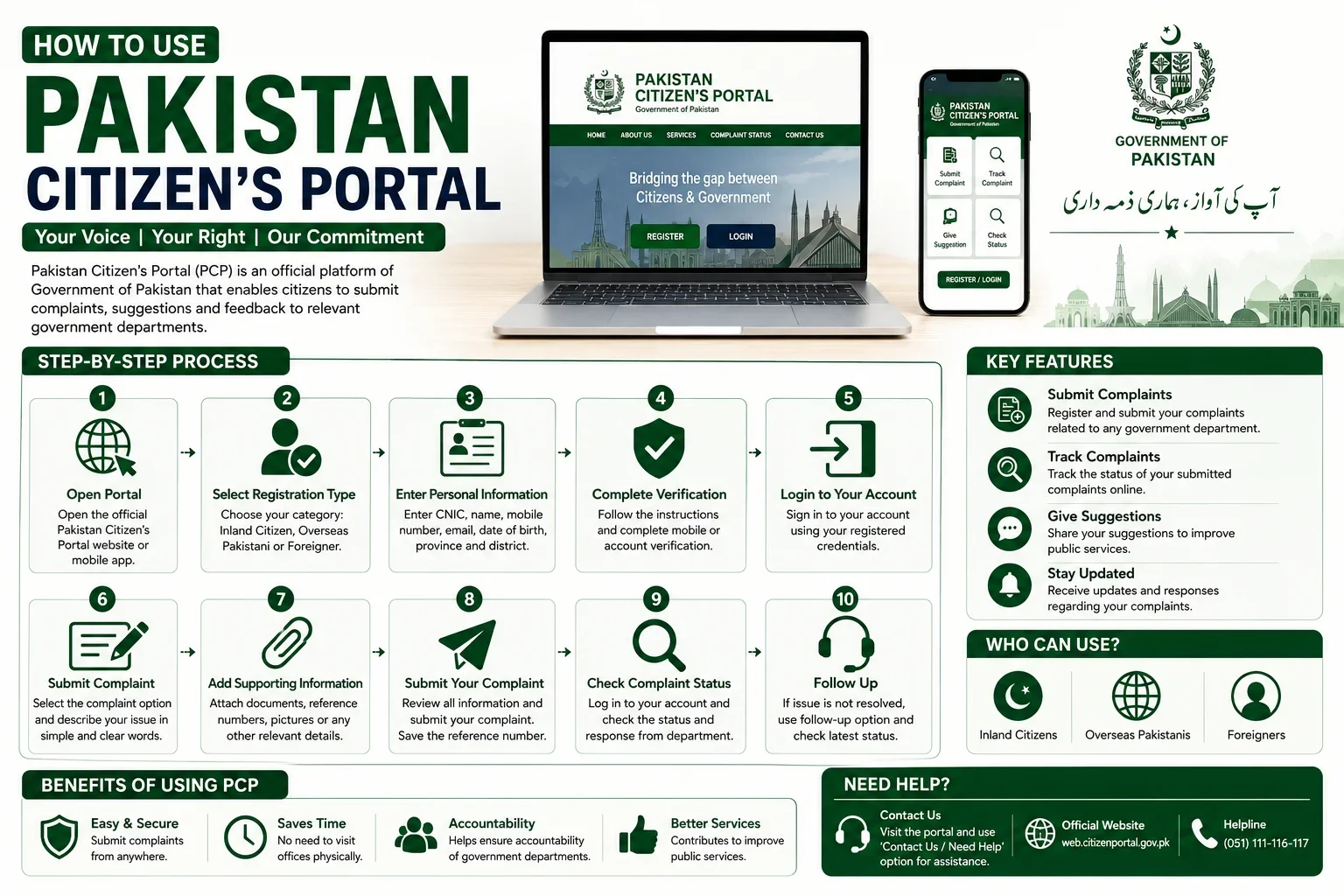
Pakistan Citizen's Portal, commonly known as PCP, is a government-supported digital platform that provides citizens with a channel to raise issues with government departments and organizations.
In everyday life, people may face different problems involving government services, departments, public facilities, administrative matters, or unresolved complaints. In some cases, a citizen may not know which government organization should receive the complaint or how to follow up on an issue.
The Pakistan Citizen's Portal is intended to make this process easier by allowing users to submit complaints and other types of feedback through a centralized platform.
A citizen can create an account, submit an issue, provide relevant details and supporting information, and monitor the complaint after submission. The complaint may then be routed to the relevant government organization for review and action according to the applicable procedures.
The platform can be particularly useful when a person wants to formally communicate a public-service problem or government-related grievance rather than relying only on informal communication.
What Is Pakistan Citizen's Portal Used For?
Pakistan Citizen's Portal can be used for different types of government-related complaints, grievances, suggestions, and public-service issues.
For example, a citizen may use the platform to communicate an issue involving a government department, public facility, administrative service, or another matter that falls within the responsibility of a government organization.
The exact categories and options available to a user may depend on the portal's current system and the organizations connected to it.
Before submitting a complaint, users should make sure that the issue is genuinely related to a government organization or public service. Complaints should contain factual and relevant information so that the concerned authority can understand the problem.
The portal should not be considered a replacement for every government service. Some services have their own dedicated websites, applications, offices, or application procedures. If a person wants to apply for a specific government service, it is advisable to check the relevant department's official website as well.
How to Register on Pakistan Citizen's Portal
To use the Pakistan Citizen's Portal, a user generally needs to create an account and provide the information requested during registration.
For Pakistani citizens living inside Pakistan, the registration process may require personal information such as:
- Full name
- CNIC information
- Mobile number
- Email address
- Nationality
- Date of birth
- Gender
- Province
- District
- Password
Users should enter their information carefully and make sure that the information provided during registration is accurate.
Depending on the current version of the portal and its verification requirements, additional information may be requested.
The registration process may also require users to accept the applicable terms and conditions before creating an account.
Registration for Overseas Pakistanis
Overseas Pakistanis may have a separate registration option on the Pakistan Citizen's Portal.
Because an overseas Pakistani may be living outside Pakistan, the registration process can require additional information related to their identity and residence.
Depending on the portal's current requirements, an overseas user may be asked to provide information such as:
- NICOP details
- Passport information
- Country of residence
- Contact information
- Reason for being abroad
- Other personal information required for verification
Users should always follow the information displayed on the official portal during registration because requirements and online forms can change over time.
Overseas Pakistanis should also ensure that the information entered into their account matches their official documents where applicable.
Can Foreigners Use Pakistan Citizen's Portal?
Pakistan Citizen's Portal also provides registration options for eligible foreign users.
The information and requirements for foreign users may be different from those applicable to Pakistani citizens. A foreign user should select the appropriate registration category and provide the information requested by the official system.
Users should avoid selecting an incorrect registration category because this may cause problems during account verification or complaint processing.
How to Log In
After completing registration, users can access their account using the login information associated with their account.
Keep your login credentials secure and do not share your password with unknown individuals.
If the portal provides an account recovery or password-reset facility, users should follow the instructions available on the official platform if they forget their password.
Always access the portal through its official website or official mobile application. Avoid entering personal information into websites or applications that claim to represent the Pakistan Citizen's Portal but are not officially operated or authorized.
How to Submit a Complaint on Pakistan Citizen's Portal
Once registration and login are complete, the user can submit a complaint or other relevant issue through the available options in the account.
The most important part of submitting a complaint is explaining the issue clearly.
A good complaint should answer basic questions such as:
- What happened?
- Which department or organization is involved?
- When did the problem occur?
- Where did the problem occur?
- What action have you already taken?
- What response did you receive?
- What solution are you requesting?
Users should avoid writing unnecessarily long descriptions that make the main issue difficult to understand.
For example, instead of simply writing "My problem has not been solved," provide relevant details about the service, application, department, date, previous complaint, and any reference number.
Provide Supporting Information
If supporting information is relevant to the complaint, users should provide it through the options available on the portal.
Depending on the type of issue, supporting information may include:
- Application or complaint reference number
- Relevant dates
- Department information
- Transaction details
- Photographs
- Documents
- Previous correspondence
- Other evidence related to the complaint
Only provide information that is relevant to the complaint and appropriate for submission.
Users should also avoid sharing unnecessary sensitive information with third parties or unknown individuals.
What Happens After a Complaint Is Submitted?
After a complaint is submitted, Pakistan Citizen's Portal can route it to the relevant government organization or authority for consideration.
The concerned organization may review the complaint and take action according to its applicable procedures.
The time required to process a complaint can vary significantly depending on the nature of the issue, the responsible organization, the information provided, and the action required.
Some issues may require verification, communication with another department, inspection, or additional information from the citizen.
Therefore, submitting a complaint does not necessarily mean that the issue will be resolved immediately.
Users should monitor their account and respond to any requests or follow-up requirements shown through the portal.
How to Track a Complaint
One of the useful features of an online complaint system is the ability to monitor the status of a submitted complaint.
After logging into the Pakistan Citizen's Portal account, users can review their submitted complaints and check the information or status available for each complaint.
Keep the complaint or reference number safely stored because it may be useful when following up on the issue.
If a complaint requires additional information, users should provide accurate information through the appropriate channel.
Users should also regularly check their account if they are waiting for an update.
What Information Should Be Included in a Complaint?
A clear and properly documented complaint is easier for the concerned authority to understand.
When submitting a complaint, consider including the following information:
1. Clear Subject
Use a short subject that explains the main problem.
For example:
"Delay in Government Document Processing"
is more useful than:
"Please Help Me."
2. Complete Description
Explain the issue in simple and factual language.
Mention important dates, locations, departments, application numbers, and previous actions where relevant.
3. Reference Number
If you previously submitted an application, complaint, request, or transaction, include the relevant reference number where appropriate.
4. Requested Solution
Explain what action you expect from the relevant authority.
For example, if an application has been delayed, explain that you are requesting the concerned department to review the delay and provide an update.
5. Supporting Evidence
If the portal allows attachments and supporting documents are relevant, provide appropriate evidence.
Who Can Use Pakistan Citizen's Portal?
Pakistan Citizen's Portal is designed to provide access to different categories of users.
Depending on the registration options currently provided by the platform, these may include:
- Pakistani citizens living in Pakistan
- Overseas Pakistanis
- Eligible foreign users
The information required during registration can vary according to the user's category.
Users should select the correct registration option and follow the instructions shown by the official portal.
Important Tips for Using Pakistan Citizen's Portal
Keep Your Information Accurate
Always provide correct personal and complaint information. Incorrect information can make it difficult for the relevant organization to verify or understand your issue.
Write One Clear Complaint
Try to focus on one specific issue when submitting a complaint. If several unrelated problems are included in one complaint, it may become difficult to determine which department should handle each issue.
Keep Reference Numbers
Save your complaint, application, or reference number after submission. It can be useful when checking the status or following up.
Avoid False or Misleading Information
Complaints should be based on genuine issues and accurate information. Do not submit fabricated claims, false evidence, or misleading information.
Use Professional Language
Describe your problem respectfully and clearly. Avoid abusive, threatening, or offensive language.
Check the Relevant Department's Website
Pakistan Citizen's Portal is primarily a communication and complaint platform. It does not necessarily replace the official application system of every government department.
If you need a specific service, application, certificate, license, registration, or document, check the responsible department's official website for the complete procedure.
Protect Your Account
Do not share your password or account access with unknown people.
Be careful of individuals who claim that they can guarantee complaint approval or government action in exchange for money.
Is Pakistan Citizen's Portal a Government Service Application Portal?
Pakistan Citizen's Portal is primarily designed as a citizen feedback, complaint, grievance, and communication platform.
This distinction is important.
For example, if a government department has a separate online system for submitting an application, the citizen may still need to use that department's official system.
The Citizen's Portal can be useful when a citizen wants to raise an issue regarding a government organization or seek attention regarding a public-service problem.
Therefore, users should identify whether they need to submit a new government application or raise a complaint about an existing issue.
Common Problems Users May Face
Users may sometimes experience difficulties with registration, login, verification, submitting complaints, uploading information, or checking complaint status.
Technical problems can occur because online systems are periodically updated or maintained.
If a user experiences a technical issue, they should first check the official Pakistan Citizen's Portal website or application for available instructions and support information.
Users should avoid relying on unofficial social media accounts, websites, or individuals for sensitive account-related assistance.
Guide Information
Eligibility
Pakistan Citizen's Portal provides registration options for different categories of users, including Pakistani citizens living in Pakistan, overseas Pakistanis, and eligible foreign users.
Eligibility and registration requirements can vary by user category. Applicants should select the appropriate registration option and follow the latest instructions provided by the official portal.
Required Documents
The exact information and supporting documents required depend on the user's registration category and the nature of the complaint.
Depending on the situation, users may need information such as:
CNIC or relevant Pakistani identity information
NICOP information for overseas Pakistanis
Passport information where applicable
Mobile number
Email address
Personal information requested during registration
Complaint or application reference number
Relevant supporting documents or photographs
Only provide information requested through the official system and relevant to your complaint.
Fees
Registration and submission of complaints through Pakistan Citizen's Portal are generally intended to be available without a government complaint-submission fee. Users should be cautious if anyone asks for money in exchange for registering an account, submitting a complaint, or guaranteeing a particular outcome. Always verify any fee-related information through the official government platform.
Processing Time
There is no universal processing time for all Pakistan Citizen's Portal complaints. Processing can depend on: Nature of the complaint Concerned government organization Required investigation Verification requirements Availability of supporting information Complexity of the issue Users should monitor their complaint through their account for updates
Application Method
Online — Web Portal Or Mobile App.
Step-by-Step Process
-
Open the Official Platform
-
Visit the official Pakistan Citizen's Portal website or use its official mobile application.
-
Select Registration
-
Choose the registration option that applies to you, such as an inland Pakistani citizen, overseas Pakistani, or another eligible category.
-
Enter Your Information
-
Provide the information requested by the registration form. Check your details carefully before submitting them.
-
Complete Verification
-
Follow any verification instructions provided by the official platform.
-
Log In
-
After successful registration, access your account using your registered credentials.
-
Create Your Complaint
-
Select the appropriate option for submitting a complaint, grievance, suggestion, or other issue.
-
Explain the Problem
-
Write a clear description of what happened. Include relevant dates, departments, reference numbers, and other useful details.
-
Add Supporting Information
-
If applicable, attach relevant documents, photographs, or other evidence through the available options.
-
Submit the Complaint
-
Review all information before submitting your complaint.
-
Track the Complaint
-
Keep your reference information and check your account for updates or further communication from the concerned organization.
Official Information
Official Website: https://web.citizenportal.gov.pk
Frequently Asked Questions
Pakistan Citizen's Portal is a government-supported digital platform that allows citizens and eligible users to submit complaints, grievances, suggestions, and government-related issues to relevant government organizations.
Registration options are available for Pakistani citizens and may also include overseas Pakistanis and eligible foreign users. Registration requirements can vary according to the user's category.
Yes. The platform provides registration options for overseas Pakistanis. Additional information such as NICOP, passport, country of residence, and other details may be required depending on the current registration process.
Eligible foreign users may have access to a separate registration option. They should follow the requirements displayed by the official portal.
You can use the platform for relevant government-related complaints, grievances, suggestions, and public-service issues that fall within the responsibility of government organizations connected to the platform.
Register for an account, log in, select the appropriate complaint or issue option, provide a clear description of the problem, add relevant information or supporting evidence where applicable, and submit the complaint through the official platform.
Users can generally review their submitted complaints and available status information through their Pakistan Citizen's Portal account.
There is no single processing time for every complaint. The time can depend on the department involved, the nature of the issue, required verification, and the action necessary to resolve the matter.
Yes. If your issue relates to a previous application, complaint, transaction, or government request, including the relevant reference number can help the concerned organization understand and locate the matter.
If the portal provides an option to attach supporting information, relevant documents, photographs, or other evidence can be provided where appropriate.
Pakistan Citizen's Portal is available through official digital channels, including mobile applications and its web platform. Users should download or access it only through official sources.
No. Pakistan Citizen's Portal should not be considered a replacement for every government department's online service system. Some government services have separate application procedures and official websites.
Use the password recovery or reset option provided by the official portal, if available, and follow the instructions shown there.
No. Keep your password private and do not share your account credentials with unknown individuals.